STATUSi for Mautic
Mautic plugin · v1.1.0

Mautic Attribution Plugin: See What Your Marketing Earned, From Inside Mautic

STATUSi joins your Mautic contacts and campaigns with Google, Meta, GA4 and your other ad platforms — deduplicated, reconciled, on one screen. The plugin adds one Statusi item to your Mautic menu, next to Campaigns and Segments, with reports, insights and integrations under it.

Free plugin · Connects to a STATUSi account · Tested on Mautic 7.2

131%
of revenue claimed by the ad platforms, combined. STATUSi reconciles every claim against real, deduplicated orders.
$70.5K
of revenue driven by email, where GA4 and click-based tools could see $19.4K. Every order is joined to the contact's send, open and click history.
$7,850
recoverable per month found by the Waste Finder: 15.7% of ad spend, invisible in any single platform's dashboard.

Figures from the STATUSi demo account. The trial finds your numbers.

What is STATUSi for Mautic?

STATUSi for Mautic is a free plugin that adds a Statusi menu to Mautic with Reports, Insights and Integrations. It connects to a STATUSi account, which matches every order to its marketing touchpoints and to a contact identity wherever one exists, so email revenue and ad revenue are measured on the same basis.

Most Mautic teams can see sends, opens and clicks, and most ad teams can see platform-reported conversions. Neither view shows what the combined spend actually returned. The plugin brings that answer into the tool where your campaigns already live, so there is no export and no second dashboard to learn.

The Statusi item sits in the Mautic menu alongside Contacts, Segments, Campaigns, Channels, Points and Stages. Under it you get Reports, Insights and Integrations.

430-second tour

Install, connect, read the report. Nothing leaves Mautic.

Recorded on a live Mautic 7.2 instance. Four stops: the plugin, the reports, the integrations, and connecting a platform.

How it works

How it works: four steps, all inside your Mautic instance

Nothing to export, no second dashboard to learn. Each step starts from the Statusi menu in Mautic.

1

Integrate

From Statusi › Integrations: Mautic contacts and activity, then Meta, Google, GA4, your other senders and cost imports. If a platform exports data, STATUSi can join it.

2

Aggregate

Every order matched to its touchpoints, and to a contact identity wherever one exists.

3

Visualize

Under Statusi › Reports and Insights: three attribution lenses, cohorts, CAC and LTV, and drill-downs by campaign, message and ISP

4

Act

Ranked findings with the dollar impact and the recommended move, every week, next to the campaigns you'll change.

What the plugin adds
One menu item, with reports, insights and integrations behind it.

Reports and insights

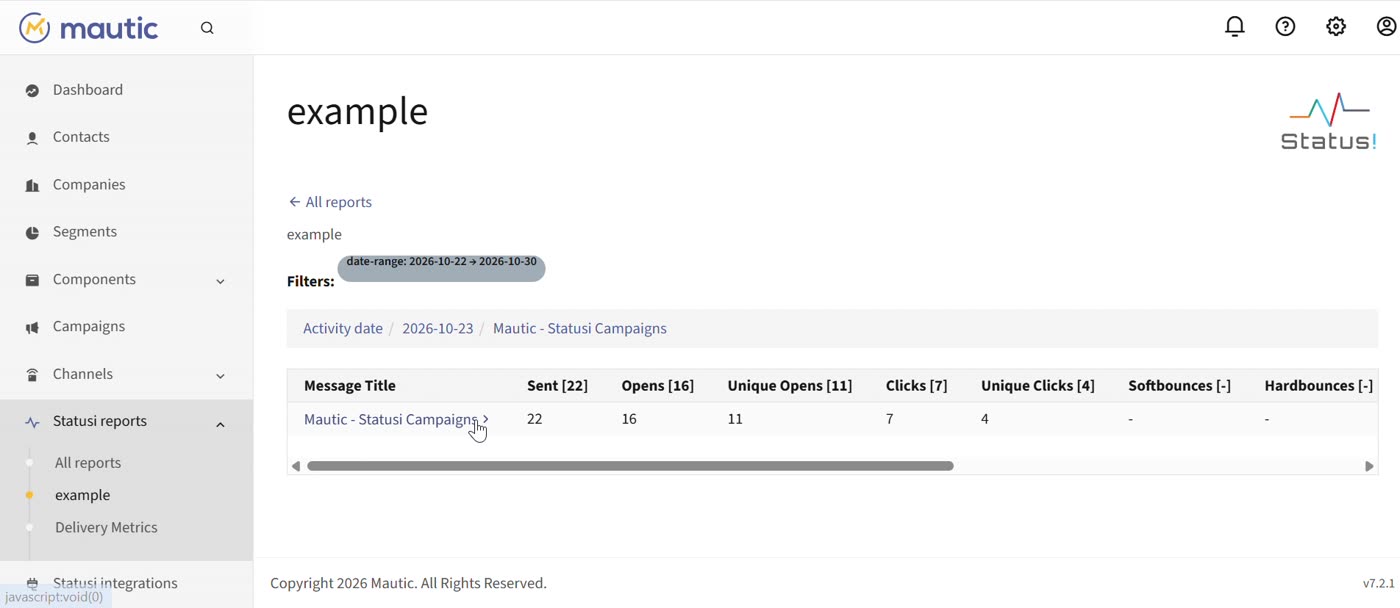
Every STATUSi report and insight your account has is rendered inside Mautic. Pick a date range and drill from activity date to campaign to message to mailbox provider.

  • Sent, opens, unique opens, clicks, unique clicks, bounces, complaints and unsubscribes
  • Open rate and average net clicks at each level of the drill-down
  • Delivery metrics by ISP (Gmail, Outlook, Yahoo) on the same screen
A STATUSi report inside Mautic, drilled down to a campaign, showing sent, opens, unique opens and clicks

Integrations

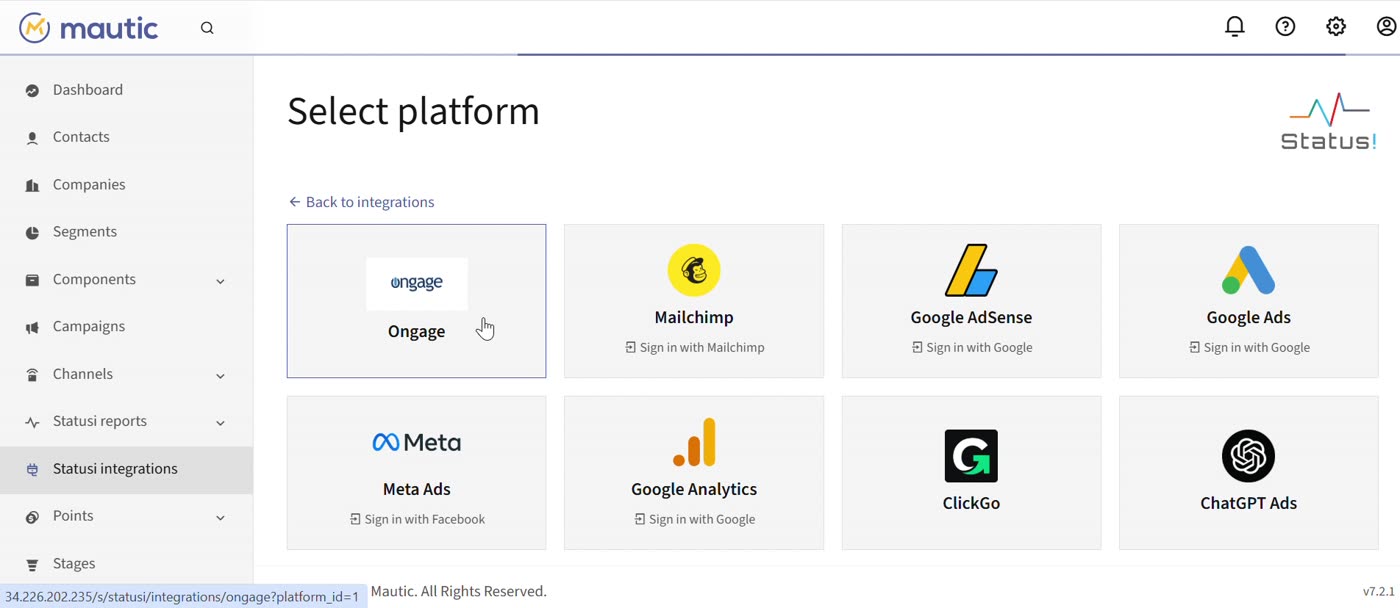
STATUSi pulls every active integration daily and joins it to your Mautic contacts.

  • Mautic contact manager and contact activity, active out of the box
  • Google Ads, Meta Ads, Google Analytics, Google AdSense, ChatGPT Ads
  • Mailchimp, Ongage and ClickGo for teams that run more than one sender
  • Sign in with Google or Facebook; API key for the rest. Activate, pause or edit any source in one click
The Select platform screen inside Mautic listing Ongage, Mailchimp, Google AdSense, Google Ads, Meta Ads, Google Analytics, ClickGo and ChatGPT Ads

Connect once, stay in control

The plugin links Mautic to your STATUSi account through a secure, read-only connection to its reports. You can see who connected it and when, and you can reconnect or disconnect at any time.

  • A Published toggle, so the menu items appear only when you want them
  • One-click Open STATUSi for the full dashboards, cohorts and Waste Finder
  • Disconnect removes the link. Your Mautic data stays where it is
The Statusi plugin dialog in Mautic showing Connected to Statusi, the account, who connected it, and Open, Reconnect and Disconnect buttons
Why a plugin, and why STATUSi

Why Mautic attribution needs more than a dashboard

Platforms grade their own homework

Each ad platform claims credit using its own model. Add the claims up and they routinely pass 100% of your revenue. STATUSi reconciles every claim against real, deduplicated orders.

Click-based tools can't see email

A subscriber who opened four emails and then typed your URL is filed as "Direct". STATUSi joins that order to the contact's full history, because the list lives in Mautic.

Dashboards stop at "what happened"

STATUSi adds the recommendation: pause, redirect or prioritise, with the dollar impact attached, so the budget call stops being a guess.

Use cases

Use cases: built for the marketer who answers for the number

For brands

One honest view of what the spend returned

Fits a brand spending $10K–$150K a month across two or more channels, with an email list that actually sends, and a founder or CFO asking what it all earned.

Pause and redirect spend
$2,340 spent. 4 keywords. 0 conversions. Flagged the same week, with the move attached.
Prioritise what compounds
$12 CAC → $340 LTV from email subscribers. Seen next to every paid channel's CAC, on the same basis.
Optimise for ROI, not ROAS
2.9× reported ROAS. 1.1 true LTV:CAC. 61% of a channel's "new" customers were already on the email list.
Know what each month's spend really bought
Cohorts by acquisition month, channel and email engagement. 90-day repeat rate: 18% for a paid cohort, 38% for the engaged email tier.
For agencies

The same truth layer on every client account

Fits an agency running Mautic for several clients, defending retainers in monthly reviews, and tired of the Q3_final_v7.xlsx conversation.

One number to defend in every review
Separated analytics per client, client-ready reports, and blended ROI instead of each platform's own claim.
Show what email did, by contact
Email's direct and assisted revenue on the same screen as paid. The work your team does in Mautic finally shows up in the client's revenue number.
Find waste before the client does
Ranked findings with evidence drill-down, across all of a client's platforms. The top findings are usually only visible through the email list.
Stay inside the tool the client already trusts
Reports live in the client's Mautic menu. No new login, no new dashboard to teach.
Compared

What each tool can actually see

CapabilityAd platformsGA4Click-based toolsSTATUSi
Deduplicated cross-channel revenue✕✕Partial✓
Overclaim exposed — claims vs real orders✕✕✕✓
Email attribution by contact identity✕✕✕✓
Order → named contact drill-down✕✕✕✓
Direct + assisted for every channel✕PartialPartial✓
Waste findings with dollar actions✕✕✕✓
Reports, insights and integrations inside your Mautic menu✕✕✕✓

"Click-based tools" are attribution products built on UTM and session tracking. The email rows are structural: those tools don't hold your list.

Use the plugin

See it on your own numbers

Tell us where to send it. You get the plugin package, the install guide, and a STATUSi trial account. The trial connects in a day.

✓Plugin ZIP for Mautic, with install steps
✓STATUSi trial account for your Mautic instance
✓A 20-minute setup call if you want one

Prefer email?

marketing@statusi.io
Thanks — check your inbox. The plugin package and your trial details are on their way. Add marketing@statusi.io to your contacts so the install guide lands where you'll see it.

We don't share your details. Consent is stored with the date and source, the way we'd tell you to.

FAQ

Questions people ask before installing

Which Mautic versions does the plugin support?

The tour was recorded on Mautic 7.2.1. Tell us your version in the form and we'll confirm support before you install. Self-hosted and managed Mautic both work.

Is the plugin free?

Yes. The plugin is free. It connects to a STATUSi account, which starts as a trial on your own data. We'll send trial details with the plugin.

Do I need a STATUSi account first?

You need one to connect. The form above sets it up along with the plugin, so you receive both together.

What data does STATUSi read from Mautic?

Two things, each as a separate integration you can see and pause: contact records (the Contact Manager task) and contact activity such as sends, opens and clicks (the Contact Activity task). STATUSi pulls active integrations once a day. The plugin itself only reads reports back from STATUSi.

Does it change anything in Mautic?

It adds one menu item, Statusi, with Reports, Insights and Integrations under it. Your contacts, segments, campaigns and emails stay as they are. Disconnecting removes the link; your Mautic data stays where it is.

Which other platforms can I connect?

Today: Google Ads, Meta Ads, Google Analytics, Google AdSense, ChatGPT Ads, Mailchimp, Ongage and ClickGo. Google and Meta use sign-in; the rest use an API key. If a platform exports data, we can add a custom integration.

Will it slow Mautic down?

No. Reports are generated in STATUSi and read into Mautic when you open them. Daily data pulls run on STATUSi's side, on a schedule you can see under Statusi › Integrations.

Can I open the full STATUSi dashboards?

Yes. The plugin dialog has an Open STATUSi button. Cohorts, CAC and LTV, the Waste Finder and the dashboards you build yourself live there; the plugin brings the reports into Mautic.

I run Mautic for several clients. How does that work?

Each client's Mautic connects to its own STATUSi account, so analytics stay separated and reports are client-ready. Tell us you're an agency in the form and we'll set up the first two together.

Where's the code?

Ask for it in the form or by email. We'll share the repository link with the install guide.